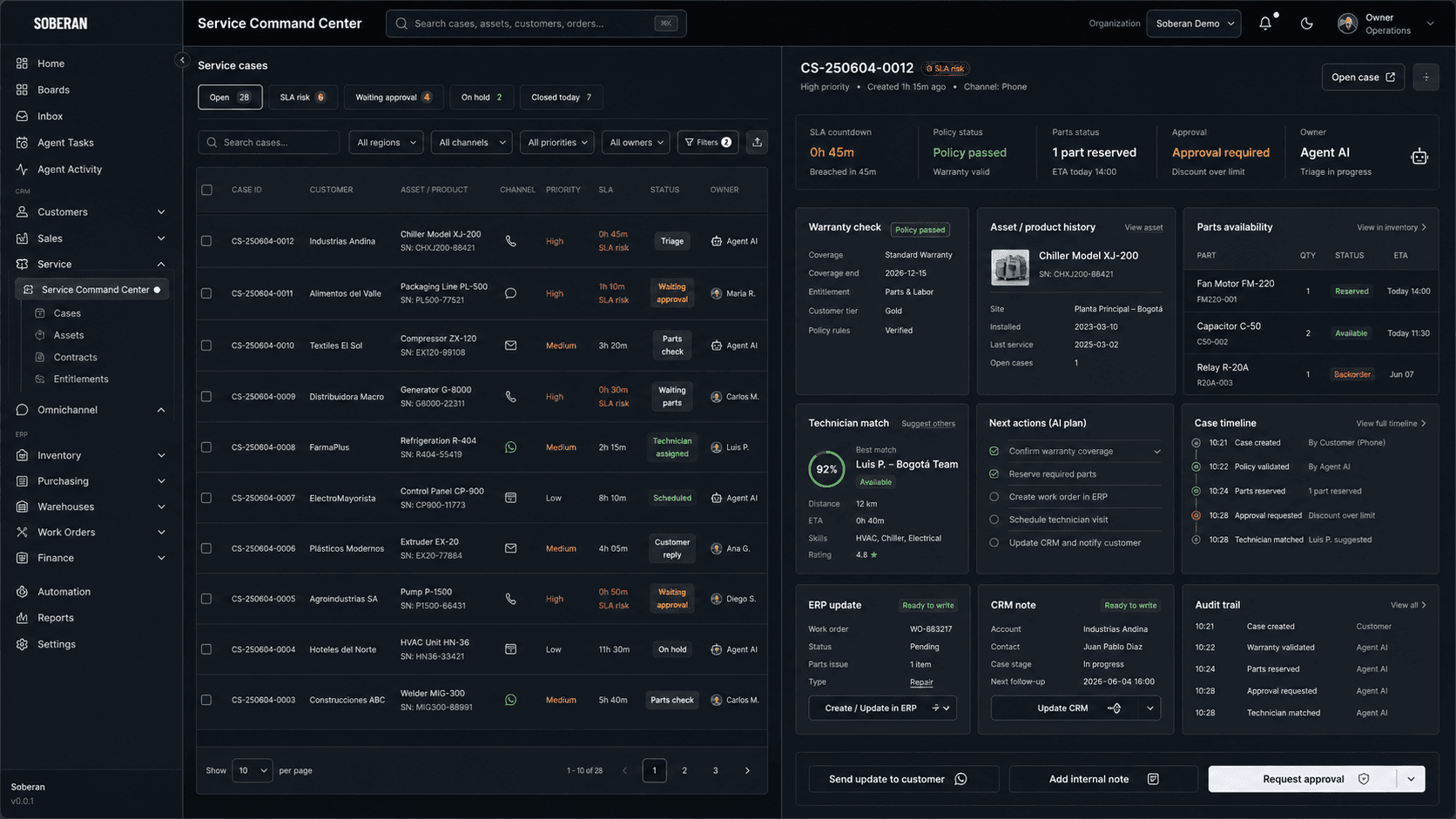
The answer: automate the service-to-parts loop, not just the service reply
The external signal is clear: enterprise AI is being embedded into ERP, customer care, field service, and asset operations. SAP is pushing governed agents across business workflows, Salesforce and ServiceNow are applying AI to field service scheduling and parts work, and McKinsey keeps emphasizing that customer care value depends on the right human-plus-AI operating model.
For SOBERAN buyers, the useful perspective is narrower: do not start with a generic customer-service agent that promises resolution without access to inventory, policy, and operating records. Start where service breaks down for customers and operators: the point where a case needs warranty validation, spare-parts availability, technician capacity, customer communication, and a clean ERP or CRM record.
Concrete workflow to automate first
- Capture the service case from phone, WhatsApp, email, portal, or CRM, then identify customer, asset, product, serial number, site, channel, urgency, and current SLA risk.
- Validate warranty, contract, entitlement, return policy, service plan, region, approval threshold, and any customer-specific rule before promising a visit, replacement, or credit.
- Check parts availability across warehouse, technician trunk stock, 3PL, open transfers, purchase orders, substitute parts, reserved inventory, and replenishment risk.
- Recommend the next action: remote fix, part reservation, technician visit, purchase request, escalation, customer update, or finance approval for an exception.
- Match technician or service partner by skill, location, availability, equipment, safety requirement, customer window, and whether the required part is already reserved.
- Update ERP, CRM, inventory, work order, service case, customer notification, and audit trail with the approved action, evidence, responsible person, and next checkpoint.
Competitor landscape
- 01
SAP Field Service and Asset Management
AI-assisted field service and asset executionSAP positions Field Service and Asset Management around AI-assisted planning, scheduling, dispatch, mobile execution, asset context, and ERP synchronization for service operations.
- Best for
- SAP-centered enterprises that need field-service scheduling, asset maintenance, mobile technician execution, and deep alignment with SAP business records.
- Note
- Mid-market buyers should inspect how non-SAP CRM, WhatsApp, local inventory, warranty exceptions, and finance approval are controlled when service spans multiple systems.
- 02
Salesforce Field Service
CRM-native field service and asset operationsSalesforce describes Field Service capabilities for work orders, asset service, operations dashboards, technician scheduling, parts usage, and CRM-connected service context.
- Best for
- Companies already standardized on Salesforce Service Cloud that want field service to sit close to customer history, service cases, appointments, and technician workflows.
- Note
- Confirm how ERP stock, finance thresholds, warehouse operations, spare-parts purchasing, and regional partner rules are synchronized outside Salesforce.
- 03
ServiceNow Field Service Management
Workflow platform for field service operationsServiceNow positions FSM around assigning the right technician, tools, and parts, with AI for work planning, dispatch, technician guidance, and first-time fix improvement.
- Best for
- Service organizations that want field operations connected to enterprise workflow, asset service, dispatch, mobile execution, and service management controls.
- Note
- Evaluate whether parts, warranty, customer communication, ERP update, and finance approval can run as one governed operating loop rather than separate service tasks.
- 04
SOBERAN
Service-to-parts automation across contact center, CRM, ERP, and inventorySOBERAN connects customer cases, WhatsApp or voice context, warranty policy, inventory signals, work-order decisions, approvals, and system updates in one governed service loop.
- Best for
- LatAm operators whose service promises depend on mixed systems, local parts availability, regional technicians, finance controls, and fast customer communication.
- Note
- Use SOBERAN when the problem is not only answering the customer, but coordinating the part, policy, technician, ERP record, CRM history, and audit trail behind the answer.
Operating model, governance, and KPIs
- Operating model: contact center owns the customer case, service operations owns technician capacity, inventory control owns part availability, finance owns exception thresholds, and CRM or ERP owners define which records the agent can update.
- Governance: require approval for warranty overrides, high-value parts, substitute parts, customer credits, finance postings, safety-sensitive work, repeated failures, and any action that changes a promised service window.
- Data policy: define source precedence for customer identity, asset serial number, warranty status, available stock, technician skills, service territory, price, cost, and customer notification language.
- KPIs: first-time fix rate, time to reserve part, SLA breach rate, technician revisit rate, part-not-available cancellations, approval aging, customer update latency, ERP completeness, CRM completeness, and service margin leakage.
- How SOBERAN fits: SOBERAN gives AI agents controlled access to the service case, customer history, inventory, ERP, CRM, WhatsApp, voice, approvals, and audit history so service decisions can be executed without losing policy or traceability.
- Internal links to prioritize: /contact-center, /automate/inbound-phone-support, /automate/chat-email-support, /automate/order-management, /automate/inventory-reconciliation, /erp, /crm, /ai-automation, and /industries/manufacturing.
Sources and trend signals
- McKinsey: AI disruption in ERPCurrent McKinsey signal on AI-integrated ERP, agentic outputs, human oversight, and the shift from menu-driven systems toward AI-driven enterprise workflows.
- McKinsey: trust in AI-powered customer careCustomer-care signal on measurable impact, trust, friction reduction, and humans and AI agents working together across customer journeys.
- SAP: Autonomous Enterprise at Sapphire 2026SAP announced governed AI agents across critical business workflows, including customer experience, supply chain, procurement, finance, and agent interoperability.
- SAP Field Service and Asset ManagementOfficial SAP page used to verify AI-assisted planning, scheduling, dispatch, mobile execution, asset service, and ERP synchronization positioning.
- ServiceNow: agentic AI in Field Service ManagementServiceNow documentation used to verify AI agents that create work orders, manage parts, validate parts usage, and adjust inventory from service activity notes.
- Salesforce Field ServiceOfficial Salesforce page used to verify work-order management, asset service, operations dashboards, parts usage, scheduling, and CRM service context.
- Sequoia: context for agents at scaleSequoia perspective used as a signal that agent reliability depends on executable context that reflects how work actually runs inside each company.
- SOBERAN contact center automationInternal SOBERAN page for connecting voice, WhatsApp, service operations, CRM, ERP, and governed automation.