La respuesta: gobierne las herramientas antes de escalar los agentes
Una señal reciente del mercado se está formando alrededor del acceso de agentes a herramientas. Model Context Protocol describe una forma estándar para conectar aplicaciones de IA con herramientas externas y fuentes de datos. Zendesk está adoptando MCP para conectar agentes de servicio con contexto y acciones de soporte. ITPro reportó aplicaciones MCP de NetSuite que permiten a asistentes de IA interactuar con datos de ERP y finanzas. SAP también posiciona agentes Joule alrededor de contexto de proceso, datos confiables, gobierno y acciones entre funciones.
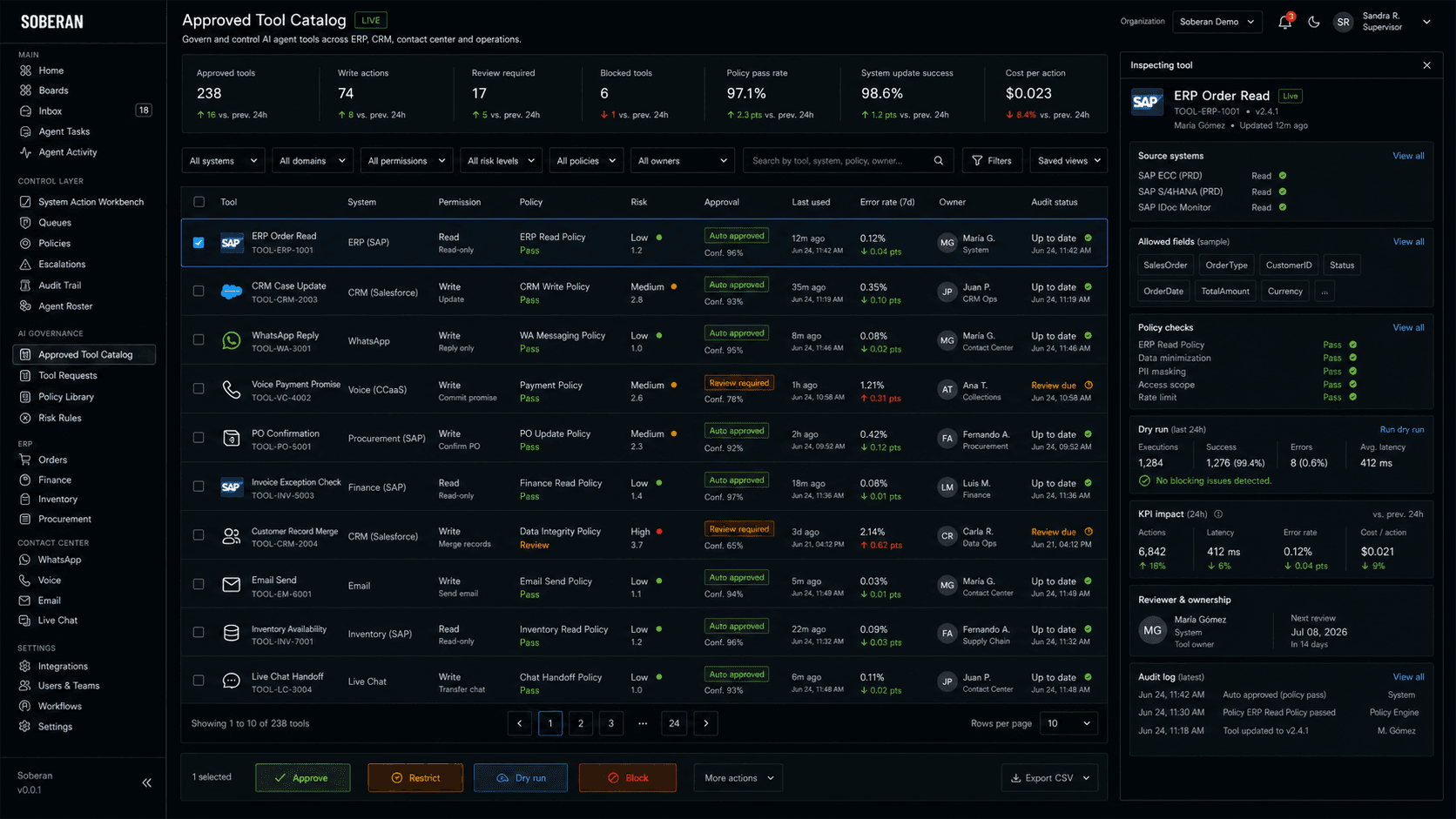
Para compradores de SOBERAN, el punto operativo es directo: un agente es tan seguro como las herramientas que puede usar. Un agente de servicio por WhatsApp, uno de cobranza por voz, uno de higiene de CRM, uno de seguimiento a compras y uno de excepciones de factura no deben heredar acceso amplio al sistema solo porque existe la integración. Cada herramienta necesita propósito aprobado, nivel de permiso, regla de política, evidencia requerida, camino de revisión y registro de auditoría.
Qué deben hacer distinto los operadores
No trate MCP, conectores, complementos o herramientas nativas de agentes como tubería propiedad solo de TI. Se convierten en la capa de ejecución para servicio al cliente, finanzas, compras y equipos comerciales. Si una herramienta puede consultar un pedido, actualizar un caso, enviar una respuesta de WhatsApp, registrar una promesa de pago, unir registros de clientes o confirmar una orden de compra, debe vivir en un catálogo operativo que los líderes del negocio puedan inspeccionar.
Esto importa para operadores medianos de LatAm porque el trabajo real está repartido entre ERP, CRM, WhatsApp, voz, hojas de cálculo, pagos, documentos tributarios, evidencia de entrega, aprobaciones manuales y mensajes de proveedores. El peligro no es solo que un agente dé una respuesta débil. Es que un agente capaz use la herramienta equivocada, opere con contexto vencido, actualice el campo incorrecto, envíe un mensaje no aprobado o cree una excepción financiera que nadie detecta hasta el cierre de mes.
Flujos que necesitan primero un catálogo aprobado
- Estado de pedidos por WhatsApp, donde el agente puede consultar estado del pedido en ERP, inventario, evidencia de entrega e historial de CRM, pero solo puede enviar mensajes aprobados para tipos de caso definidos.
- Cobranza por voz, donde el agente puede consultar saldo, antigüedad, consentimiento e historial del cliente, mientras las promesas de pago y actualizaciones financieras requieren controles de política y umbrales de revisión.
- Higiene de datos en CRM, donde detección de duplicados, enriquecimiento de cuentas y creación de próximas acciones usan herramientas separadas con permisos, límites de confianza y reglas de revisión distintas.
- Confirmación de compras, donde contacto con proveedores, estado de orden de compra, variación de precio y actualización de fecha de entrega se separan en acciones de solo consulta, revisadas y automáticas.
- Revisión de excepciones de factura, donde la evidencia de orden de compra, recibo, factura, impuestos y nota crédito puede reunirse automáticamente, pero liberar, retener o ajustar requiere una ruta explícita de aprobación.
- Priorización de servicio, donde el agente puede resumir evidencia y recomendar prioridad, mientras los mensajes que impactan al cliente y la reasignación de casos siguen política de canal y reglas de auditoría.
Intención de compra: pida ver el catálogo de herramientas
Una plataforma seria de automatización debe poder mostrar el catálogo antes de la demostración. Pregunte qué herramientas existen para ERP, CRM, centro de contacto, WhatsApp, voz, finanzas y compras; quién aprobó cada una; qué puede consultar o actualizar; qué políticas aplican; qué acciones requieren revisión; y cómo se registra cada uso.
El catálogo no debe ser una lista estática de integraciones. Debe mostrar comportamiento operativo en vivo: volumen de uso, tasa de aprobación, usos bloqueados, tasa de error, éxito de actualización del sistema, indicadores de impacto al cliente, costo por acción y última decisión de política. Así el comprador ve si el agente está haciendo trabajo controlado o simplemente ganando acceso invisible.
Modelo operativo y gobierno
- Clasifique herramientas por riesgo de negocio: consulta de contexto, mensaje al cliente, actualización de CRM, actualización de ERP, acción financiera, acción de compras y acción solo para supervisión.
- Asigne un responsable de negocio para cada herramienta aprobada, no solo un responsable técnico de integración.
- Separe permisos por cola, canal, sistema, política y nivel de impacto al cliente.
- Use simulaciones para acciones de alto impacto, de modo que supervisores puedan revisar cambios propuestos antes de mover registros.
- Exija paquetes de evidencia para acciones de actualización: registro fuente, contexto del cliente, resultado de política, regla de revisión e impacto esperado en indicadores.
- Revise el catálogo en cada ciclo de puesta en producción: retire herramientas sin uso, ajuste alcances, bloquee acciones riesgosas y documente cambios de política.
Indicadores que prueban que el gobierno de herramientas funciona
- Herramientas aprobadas por cola, sistema y nivel de permiso.
- Usos de herramientas por tipo de acción: consulta, mensaje, actualización sugerida, actualización revisada y actualización automática.
- Tasa de cumplimiento de política, tasa de usos bloqueados, tasa de revisión requerida y tiempo de aprobación.
- Tasa de éxito en actualizaciones de ERP y CRM, creación de duplicados, volumen de corrección y fallas de acción en sistemas.
- Indicadores de impacto al cliente después del uso de herramientas: contacto repetido, casos reabiertos, tasa de quejas, promesas de pago cumplidas y precisión de entrega.
- Exposición en finanzas y compras: efectivo en riesgo, valor de excepciones de factura, valor de variaciones en órdenes de compra y riesgo bloqueado.
- Costo por acción aprobada y costo por resultado operativo verificado por cola.
Riesgos que debe gobernar
El primer riesgo es la proliferación de herramientas. A medida que los proveedores publican más conectores para agentes, los equipos pueden aprobar acceso más rápido de lo que definen política. El segundo riesgo es la deriva de permisos: una herramienta creada para consulta de soporte termina convirtiéndose en una vía para cambiar registros, enviar mensajes a clientes o afectar finanzas. El tercer riesgo es el acoplamiento oculto, donde una acción del agente dispara consecuencias en ERP, CRM, inventario, pagos o servicio que el supervisor no puede ver.
La investigación de seguridad sobre ecosistemas MCP también apunta a inyección de instrucciones, manipulación de herramientas y brechas de autorización como problemas que deben gestionarse antes del uso en producción. Para operadores, la defensa práctica no es temerle a las herramientas. Es un catálogo que haga cada herramienta visible, acotada, monitoreada y conectada con responsabilidad de negocio.
Cómo encaja SOBERAN
SOBERAN está construido para operaciones donde agentes, canales de clientes y sistemas de registro necesitan una sola superficie gobernada. Una implementación de SOBERAN puede poner WhatsApp, voz, CRM, ERP, finanzas, compras y acciones de servicio detrás de un catálogo visible: propósito de la herramienta, permiso, política, evidencia fuente, regla de aprobación, responsable, resultado de simulación e historial de auditoría.
Así los equipos medianos pueden ampliar automatización sin convertir integraciones en acceso ciego. Los operadores pueden empezar con herramientas de solo consulta, avanzar a actualizaciones revisadas y permitir acciones automáticas estrechas solo cuando la cola demuestre datos limpios, cumplimiento de política, éxito de actualización del sistema y mejora de indicadores.
Rutas operativas relacionadas de SOBERAN
- Empiece con /integrations cuando el comprador necesita conectar ERP, CRM, centro de contacto, WhatsApp, voz y sistemas operativos bajo una sola superficie de control.
- Use /ai-automation cuando la prioridad es ejecución gobernada de agentes en colas operativas, no herramientas de IA desconectadas.
- Use /erp y /automate/order-management cuando los agentes necesitan evidencia de pedidos, inventario, entrega, órdenes de compra y finanzas antes de actuar.
- Use /crm y /automate/crm-data-hygiene cuando los agentes pueden actualizar registros de clientes, unir duplicados o crear próximas acciones.
- Use /contact-center, /contact-center/whatsapp y /automate/whatsapp-customer-service cuando los mensajes a clientes requieren contexto aprobado y política de canal.
- Use la página de voz del centro de contacto y la automatización de soporte telefónico cuando los agentes necesitan consentimiento, pago, escalamiento y controles de política de servicio.
- Use /automate/procurement-automation y /automate/invoice-verification-against-pos cuando las herramientas tocan proveedores, órdenes de compra, excepciones de factura o aprobaciones.
Fuentes y señales de tendencia
- Model Context Protocol: introducciónUsado para la señal de acceso a herramientas: MCP estandariza cómo aplicaciones de IA se conectan con herramientas, datos y sistemas externos.
- TechRadar Pro: Zendesk adopta MCP para servicio con IAUsado para la señal de servicio al cliente: plataformas de soporte conectan agentes de IA con contexto empresarial y acciones mediante MCP.
- ITPro: aplicaciones MCP de NetSuite abren datos de ERP y finanzas a asistentes de IAUsado para la señal de ERP y finanzas: sistemas empresariales exponen datos operativos y acciones a asistentes de IA mediante herramientas tipo conector.
- SAP: Joule Agents and SAP AI Agent HubUsado para la señal de proceso empresarial: los agentes se posicionan alrededor de contexto de negocio, datos confiables, gobierno y acciones entre funciones.
- arXiv: modelado de amenazas MCP y manipulación de herramientasUsado para la señal de riesgo: las implementaciones MCP necesitan defensas contra inyección de instrucciones, manipulación de herramientas, brechas de autorización y fallas de transparencia para usuarios.