01
Procurement
Identify overdue purchase orders and upcoming supplier commitments. Open the order to review the details.
Purchase ordersSOBERAN · Supply Chain Control Tower
Procurement, receiving, production and outbound fulfillment in one operational view. See what is at risk, what comes next and where your team needs to step in.
01 · Inside SOBERAN
Network health, commitments and the exception queue share one screen. Move from the big picture to the flow that needs attention.
Actual SOBERAN screenshots · Acme organization · Demonstration data · English interface
Follow commitments across teams without piecing the story together in spreadsheets. Every signal keeps its reference, status, date and warehouse when available.
Identify overdue purchase orders and upcoming supplier commitments. Open the order to review the details.
Purchase ordersSee goods receipts and their relationship to the purchase order. Separate what is expected from what has arrived.
Goods receiptsReview work orders, planned dates and delays to focus attention on production commitments.
Work ordersBring shipments and fulfillment tasks together. Find delays, blockers and records packed or ready to ship.
Shipments + fulfillment02 · Exception management
An overdue purchase, a late work order or a blocked shipment should not disappear among records. Control Tower puts them in context so your team can act.
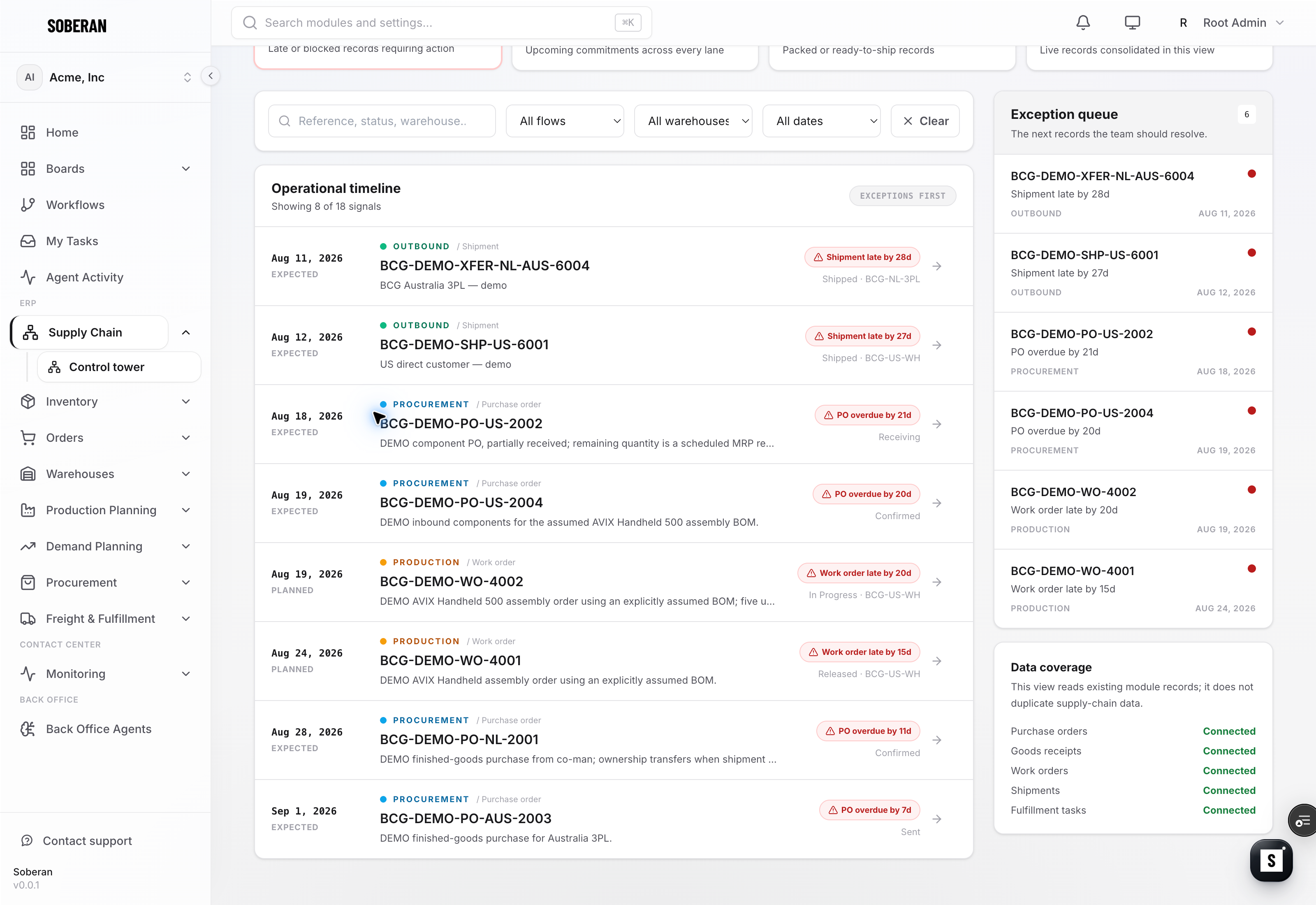
Review critical exceptions and commitments due in the next seven days from the indicators.
Filter by flow, warehouse or date. Search for a reference to find the relevant records.
Enter the purchase order, receipt, work order, shipment or task to continue work in its module.
03 · Connected operations
The tower reads configured SOBERAN modules and consolidates their signals. Data coverage shows which sources are connected and which still need configuration.
Coverage depends on the modules and sources configured for your organization.
04 · FAQ
An operational view across procurement, receiving, production and outbound fulfillment. It helps teams identify risks and commitments, filter the operation and open source records to continue their work.
Overdue purchase orders, late work orders and shipments, upcoming commitments and inventory reservation blockers in fulfillment. Classification depends on the status and dates available in each record.
Yes. Filter by flow, warehouse and horizon: overdue records, the next seven days or the next thirty days. You can also search by reference, status and other record details.
No. It reads existing records from configured modules. Each event retains a link to its source record, and the coverage panel shows the available sources.
This view prioritizes and presents exceptions. Your team opens the corresponding record to manage them; automations are configured separately for each operational workflow.
Shared visibility. Decisions in context.
Bring procurement, warehouse, production and logistics around one view. Start with the flows your team needs to control.
See your control towerReview one workflow with our team — 30 minutes, no commitment.
Book a demo