Disconnected shipment data
Planners lose time rebuilding orders, package dimensions, and vehicle information across spreadsheets and separate transport systems.
SOBERAN ERP · Load Planning
Turn ready shipments into validated vehicle plans, with the operational rules and evidence your team needs to approve and execute each load.
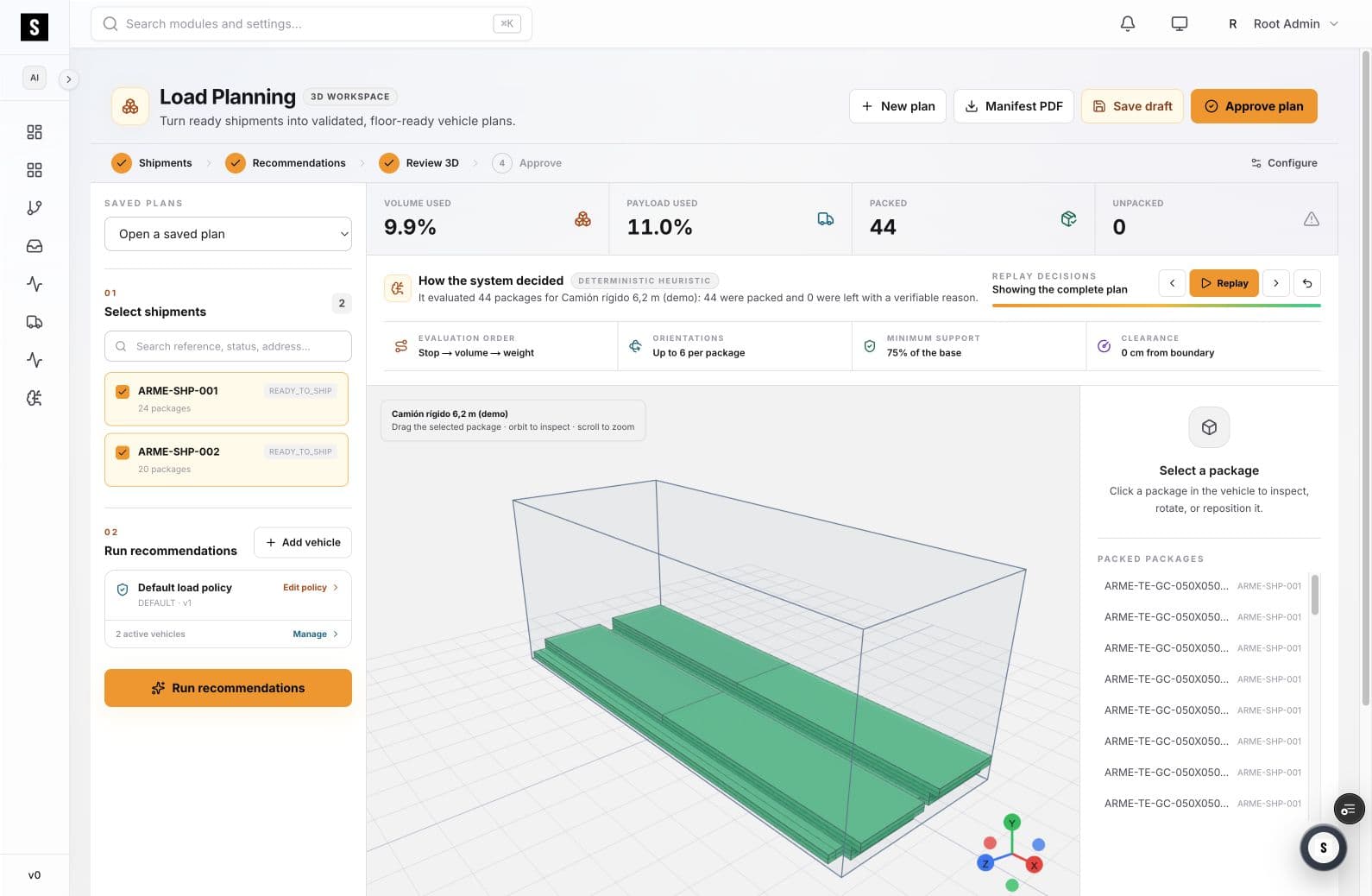
SOBERAN Load Planning is a visual 3D workspace for selecting shipments, evaluating package placement, validating vehicle constraints, reviewing the system’s decisions, and releasing a floor-ready plan.
01
A mathematically possible arrangement can still fail when weight, support, orientation, clearance, shipment priorities, or floor execution are ignored.
Planners lose time rebuilding orders, package dimensions, and vehicle information across spreadsheets and separate transport systems.
Cube alone does not explain whether a package is supported, correctly oriented, clear of the boundary, or practical to unload.
When the recommendation is a black box, operators cannot verify why a package moved, stayed out, or was assigned to a vehicle.
02
The workspace keeps selection, recommendation, review, and approval in one operational sequence.
Choose the ready-to-ship work that belongs in the planning run and keep package context attached.
Evaluate package dimensions, volume, weight, supported orientations, minimum base support, clearance, and vehicle capacity.
Inspect the vehicle, orbit the plan, select individual packages, and replay how the arrangement was built.
Save the draft, resolve exceptions, approve the plan, and create a manifest for floor execution.
03
Track both volume used and payload used instead of treating vehicle capacity as a single number.
Evaluate allowed orientations and minimum base support at package level.
Validate distance from the vehicle boundary before approval.
Review the evaluation order and replay the complete plan to understand the recommendation.
04
05
Build and compare plans without reconstructing shipment data by hand.
Validate that the recommended arrangement is executable before releasing it.
Connect the approved plan to shipment and freight execution context.
07
Load planning software helps teams arrange packages, pallets, or freight inside a vehicle or container while checking capacity and physical constraints. SOBERAN adds shipment context, visual 3D review, decision replay, and approval to that planning step.
Yes. The workspace displays volume used and payload used separately so a plan is not approved on cube utilization alone.
Yes. Packages can be selected in the 3D vehicle view for inspection, rotation, or repositioning during review.
The reviewed plan can be saved, approved, and exported as a manifest so the floor receives a defined loading sequence and vehicle plan.
SOBERAN ERP · Load Planning
We can map your package data, vehicles, loading rules, and approval flow against the SOBERAN workspace.
Book a working sessionRevise um fluxo com nossa equipe — 30 minutos, sem compromisso.
Agendar demonstração