Flat reports hide geometry
Rows and totals cannot show contact surfaces, gaps, orientations, or the spatial relationship between packages.
SOBERAN ERP · 3D workspace
See the complete vehicle plan, select individual packages, replay the recommendation, and verify the rules behind each placement.
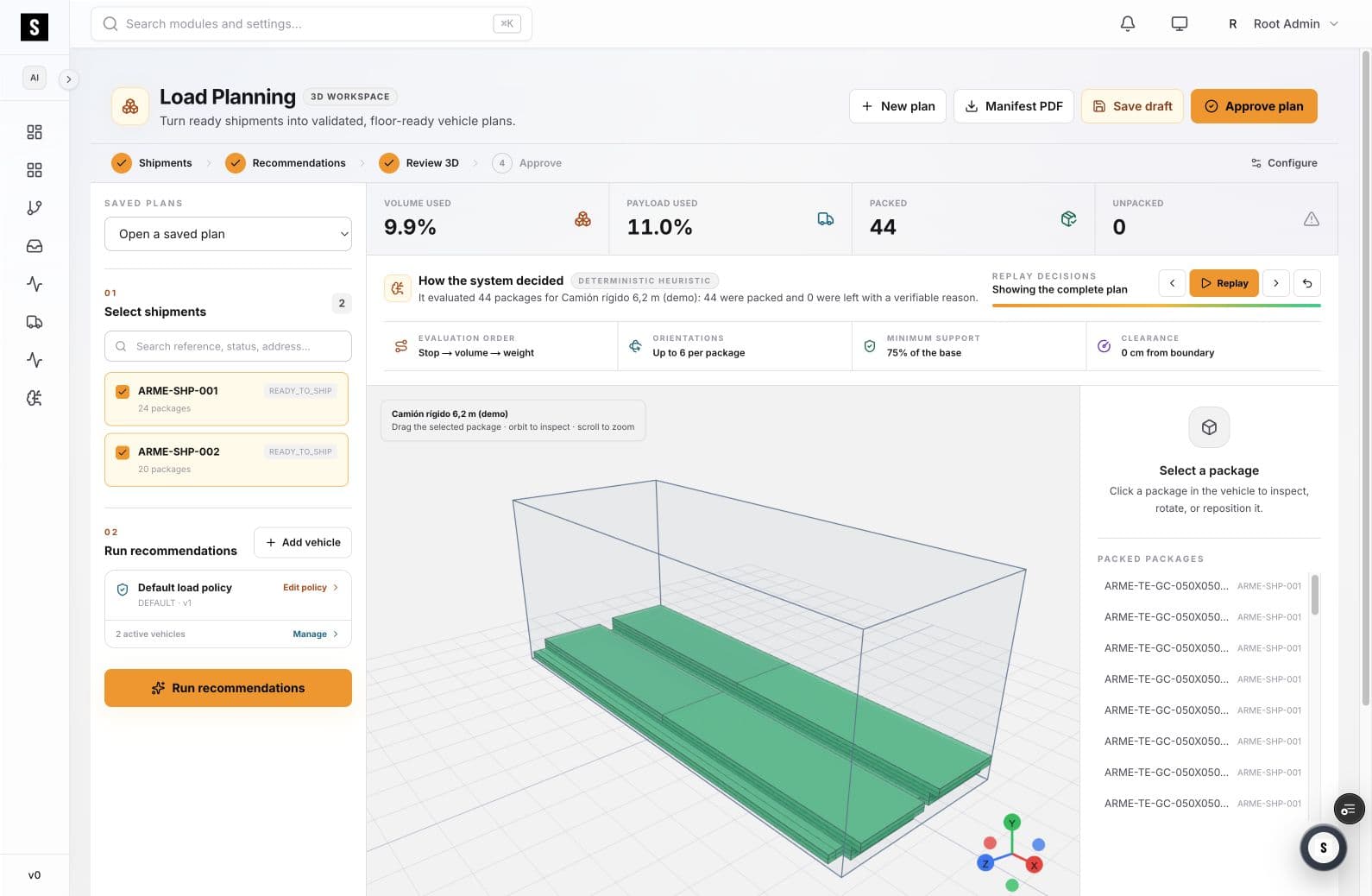
SOBERAN’s 3D Load Planning workspace turns a packing recommendation into an inspectable operational model. Teams can orbit the vehicle, select packages, review constraints, and replay how the plan was produced.
01
Utilization percentages matter, but the person approving the load also needs to see where every item sits and why.
Rows and totals cannot show contact surfaces, gaps, orientations, or the spatial relationship between packages.
A planner needs a way to inspect the logic before accepting an automated arrangement.
When planners and operators work from different artifacts, execution drifts from the approved recommendation.
02
The 3D model is part of the planning workflow, not a decorative rendering.
Run the recommendation against the selected shipments, vehicle, and load policy.
Orbit and zoom to inspect the arrangement from the angle the reviewer needs.
Select a package to examine its placement and, when needed, rotate or reposition it.
Step through the recommendation to understand how the complete arrangement was formed.
03
The usable space is visible around the complete package arrangement.
Each package appears as a spatial object, not only as a line item.
Replay controls make the construction of the plan reviewable.
Evaluation order, orientation, support, and clearance stay visible beside the model.
04
05
Validate the recommendation and handle exceptions before approval.
Review the complete vehicle and confirm the plan can move to execution.
Work from a visual representation of the approved arrangement.
07
Yes. The workspace supports orbiting and zooming the vehicle and selecting individual packages for inspection.
The workspace shows the evaluation policy and provides replay controls so reviewers can follow the recommendation rather than receiving only a final score.
The package inspector is designed for selecting, rotating, and repositioning packages while reviewing the vehicle plan.
SOBERAN ERP · 3D workspace
A working session is most useful with real package dimensions, vehicle constraints, and a representative loading policy.
Book a working sessionRevise um fluxo com nossa equipe — 30 minutos, sem compromisso.
Agendar demonstração