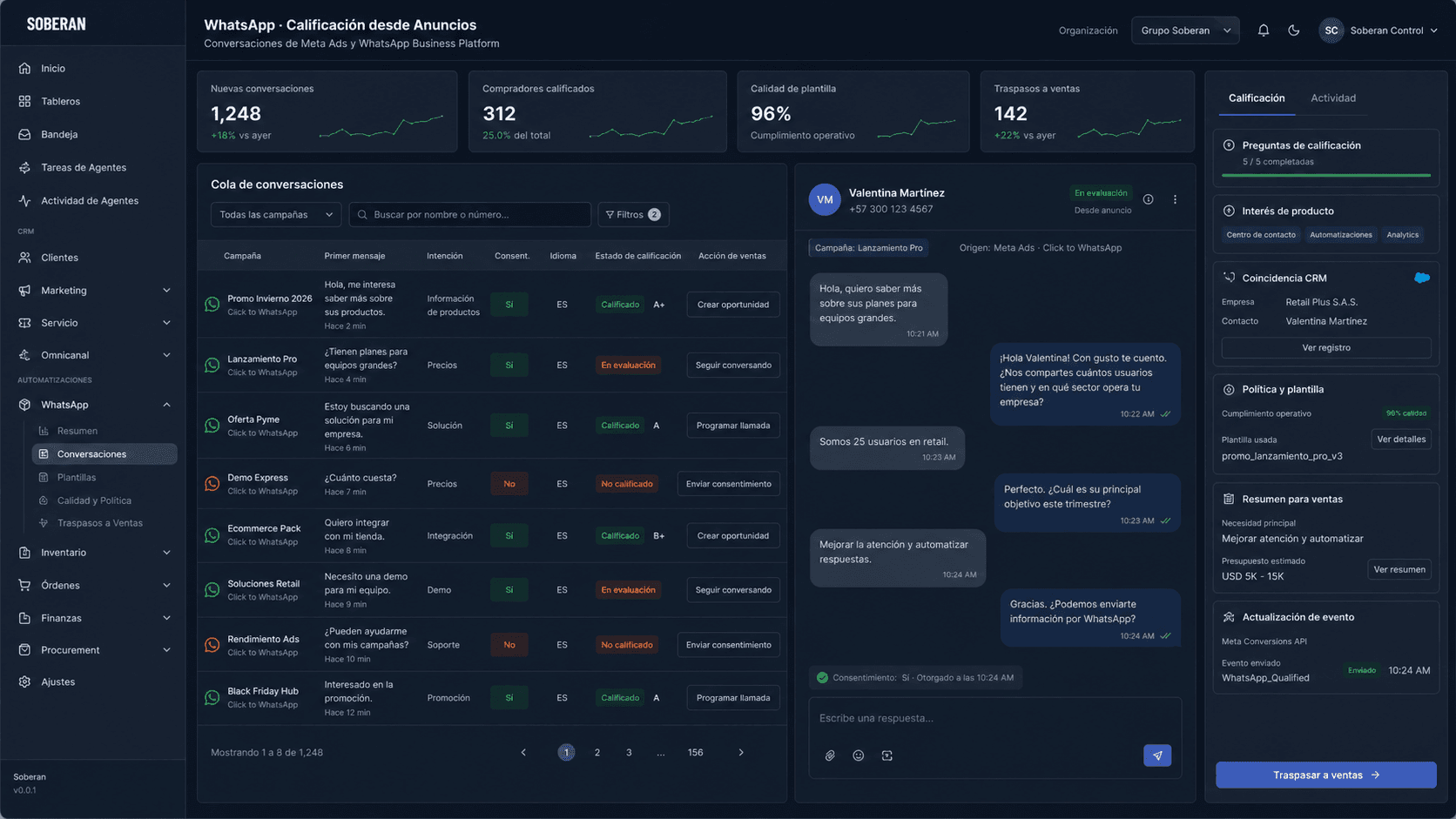
The answer: automate the click-to-chat qualification loop
The workflow should start with Meta ad and WhatsApp context, recognize the person or account, ask only the missing questions, check consent and template policy, decide whether the buyer is sales-ready, and update CRM with the conversation evidence.
Buyer intent is strongest in consumer services, education, real estate, healthcare, ecommerce, automotive, and B2B companies where WhatsApp is the front door for fast buying questions.
Concrete workflow to automate first
- Capture Meta campaign, ad, creative, keyword, WhatsApp entry point, first message, language, region, phone number, consent state, and product interest.
- Match the contact to CRM, existing customer records, open opportunities, prior chats, support tickets, and duplicate phone numbers before creating anything new.
- Ask two to five qualification questions based on the offer: need, budget range, urgency, location, inventory requirement, service date, or preferred appointment.
- Apply policy checks for opt-in, template category, 24-hour service window, restricted claims, sensitive topics, and escalation rules.
- Transfer to sales with a short packet: campaign, buyer answers, conversation summary, product interest, urgency, recommended next step, and CRM record link.
- Send conversion events and CRM updates so marketing can compare ad spend to qualified opportunities, not only started conversations.
Competitor landscape
- 1
Manychat
WhatsApp ad automationManychat documents a WhatsApp Ads Trigger that sends people from Meta ads into WhatsApp automation for prequalification and funnel steps.
- Best for
- Marketing teams that want fast campaign-to-message automation and a familiar flow builder.
- Note
- Evaluate whether CRM evidence, consent audit, and sales transfer quality are strong enough for serious sales operations.
- 2
respond.io
Conversation management plus CRMrespond.io positions WhatsApp CRM connectivity, AI agents, and native lead management for teams that sell through customer conversations.
- Best for
- Teams with many messaging channels and a need for a shared inbox plus CRM context.
- Note
- Compare inbox breadth with how deeply the qualification policy can act across CRM and operating systems.
- 3
Wati
WhatsApp team inbox and automationWati describes Click-to-WhatsApp ads, WhatsApp automation, sales tools, analytics, and Astra AI agents for qualification and support.
- Best for
- WhatsApp-first teams that need a packaged team inbox and campaign automation.
- Note
- Ask how policy checks, CRM deduplication, and audited updates are handled when volume grows.
- 4
SOBERAN
WhatsApp qualification with governed CRM actionSOBERAN connects WhatsApp conversations to CRM, calendars, sales ownership, and operating context so the transfer is explainable and auditable.
- Best for
- LatAm and global teams where WhatsApp is a revenue channel and sales needs clean CRM records.
- Note
- Use SOBERAN when the job is not only responding in WhatsApp, but controlling qualification, routing, and updates across systems.
Operating model and governance
Marketing should own campaign context and conversion tracking. Sales operations should own qualification rules and CRM mapping. Legal or compliance should approve message categories, opt-in language, sensitive-topic escalation, and restricted claims.
The agent should not decide policy from free-form chat. It should use approved question sets, allowed templates, CRM validation, confidence thresholds, and human review for high-value or ambiguous buyers.
Metrics that prove the workflow is working
- Ad click to first WhatsApp response time.
- Conversation-to-qualified-opportunity rate by campaign and offer.
- Sales transfer acceptance rate and meeting booked rate.
- Template quality, opt-out rate, and policy exception rate.
- Duplicate contact creation rate and CRM update error rate.
- Cost per qualified opportunity, not only cost per message conversation.
How SOBERAN fits
SOBERAN fits when WhatsApp qualification must become a real sales operating loop. The agent can read campaign context, ask governed questions, update CRM, create sales tasks, book meetings, and preserve a record of what was asked and why a buyer moved forward.
Start with /automate/whatsapp-lead-qualification. Related internal pages include /contact-center/whatsapp, /automate/inbound-lead-conversion, /automate/sales-follow-up, /crm, and /how-it-works.
Sources and trend signals
- Meta: click-to-message adsOfficial Meta reference for ads that open conversations in Messenger, Instagram, or WhatsApp.
- Meta: lead ads with messagingOfficial Meta reference for lead generation ads that connect people to messaging conversations.
- WhatsApp Business policyPrimary policy reference for business messaging constraints and permitted activity on WhatsApp.
- Manychat: WhatsApp Ads TriggerCompetitor documentation for sending Meta ad clicks into WhatsApp automation.
- respond.io: WhatsApp CRMCompetitor page for WhatsApp Business API, CRM connection, and conversation management.
- SOBERAN: WhatsApp lead qualification automationInternal use-case page for the matching WhatsApp qualification workflow.